

tl;dr
- Challenge 2 of Batman Investigation series
- Ransomware Investigation
- Rust based Ransomware Analysis with process dump analysis to recover the randomly generated decryption vector and windows malware analysis
- Recovering from a ransomware attack
Challenge Points: 1000 No. of solves: 1 Challenge Author: Azr43lKn1ght
Challenge Description:#
Azrael the Archangel of Vengeance has joined the batfamily after destroying the machine of St Dumas defeating face to face against his most startling foe, the undying heirophant, the first son of St Dumas. The Dumas is not completely destroyed and the heirarchy out somewhere out, Jean Paul, our Azrael has a shared workspace with Duke Thomas, The signal. St Dumas got them now by sending the weapon of azrael but we got the attack process captured by signal as he was the one who let it in unknowingly. Azrael and Signal are trying to fix things to get back whatever is lost as well not get in the clutches of the order. They should now have to safegaurd batman’s files as well as their own important ones. if they get it back before Dumas knowing they are getting close to finding them to stop the order as well the birth and training of new Azraels when they are waiting for negotiation or some plan to take our protagonists with hold of the recovery shard. Can you help them to recover from the loses and find the weapon of Azrael ,so they can take down the order of the St Dumas?
File Password : E6qK~$9pUIk0kT'3&N/Okt
Challenge Files:
Flag format: bi0sctf{...}
We’ll be starting with question 5 of the challenge cuz that’s where the real reversing comes in, so the quesiton 5 is as follows
Question 5#
Q5) What is the ip and port the malware is sending the decryption essential to? Format: ip:port
so first let’s start analysing the mssetup.exe file.
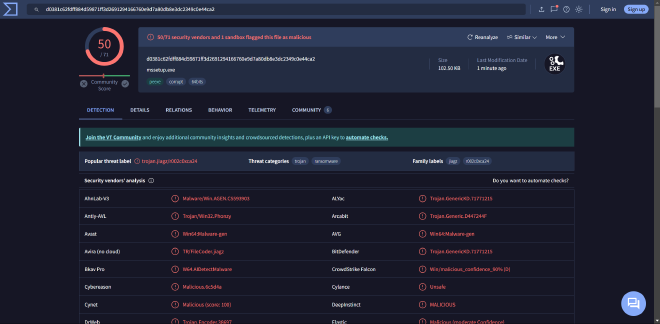
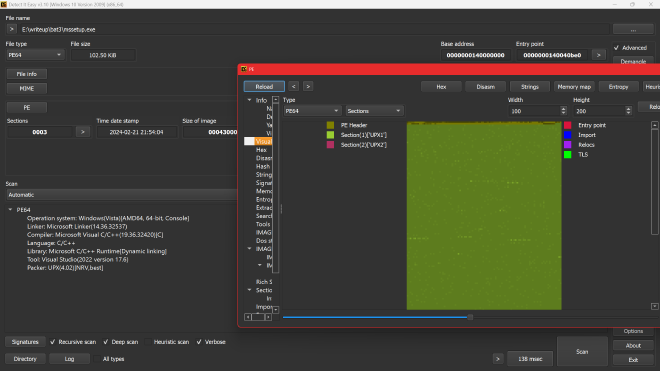
using detect it easy we can see that it is packed with upx, let’s unpack it
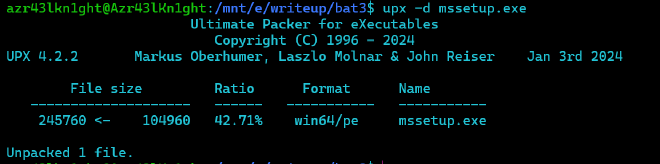
now let’s check again
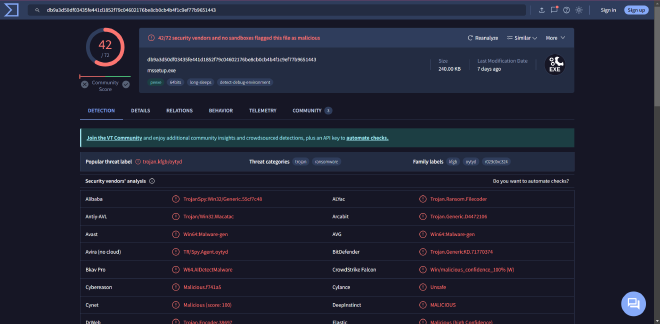
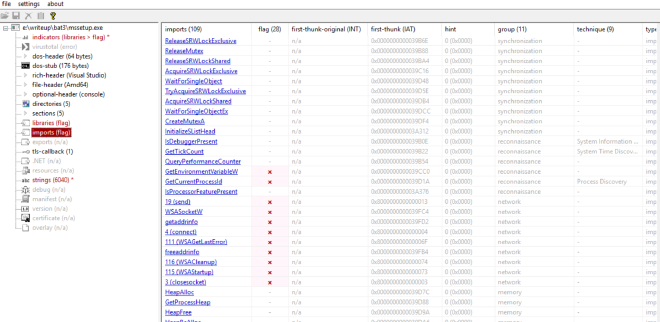
now it is pretty normal with sections and imports being normal, so we can start static analysis.
Triaging#
Running file on the binary shows it’s a 64 bit PE executable
We open the binary in Detect_it_easy,
And we can clearly see it is a UPX packed binary, meaning we would have to unpack it first
Can be done using
upx -d mssetup.exe

Now the unpacked binary when put through DIE seems to be normal
trying strings on it we see a few intersting strings such as

- A ransom note looking text
- 98238588864125956469313398338937
- Azr43l_README.txt
- C:\Windows\System32\winevt\Logs
- C:\Windows\PrefetchC:\Windows\Temp
- C:\Users\Public\Documents\Recent
- C:$Recycle.BinC:\Windows\Logs
- C:\Windows\System32\config
- C:\Windows\SoftwareDistribution
- USERNAME
- C:\UsersDownloadsDesktop0_o
- AppData\Roaming\Notepad++Documents168133:

we also see strings pertaining to chacha20, giving us a small idea on what this ransomware might entail
Static Analysis#
Now we can load the binary into IDA 8.3 Freeware
And we find main fairly easily
Getting to main#

In a rust binary unlike the C/C++ binaries, the main is not actually a main, rather it passes the function pointer of main to another function called lang_start
Anti Debug Check#
Now heading into the actual main we see, An IsDebuggerPresent call

So we can easily either NOP out these bytes or convert the jnz to jz as such


Now this would help us during our debugging session, if we need to step through this function
Lastinputinfo#
Next we have this block of code between lines 123 - 130

Googling for the struct LASTINPUTINFO

As it says, we get a structure filled with the last input info

This function fills the dwTime field of the structure with the milliseconds (tick count) of the last input info. The milliseconds here are from the start of system_time
Analysing the next block of code,
GetTickCount()#
We see GetTickCount() being called
As mentioned, it returns the number of milliseconds since the system was started,
And that is being subtracted from the time the last input was taken and compared against 59999, and is evaluated true if greater. Ie it would be false if it is under 60000ms, 60000ms is 60s i.e 1 min. The malware checks if the computer was idle for the last minute, if it was idle, then it exits . This is one of the conditions
For the next block of code above, in the if condition we see it takes a fills a structure plii with the current cursor position and and then sleeps for 5 seconds, then measures the next cursor position and we can see a ‘mm_cmepeq_epi132’ , indicating a compare, thus these two measured cursor positions are compared and if it is the same then it is marked as True, at which point the malware exits and stops running as well.
Once the if condition is cleared,
in the block of code below
We see the use of a function “GetAsyncKeyState”
GetAsyncKeyState()#
We can look up the MSDN webpage associated to GetAsyncKeyState

As it mentions, it determines which key was pressed during the latest IO operation
And we have GetAsyncKeyState(1) and GetAsyncKeyState(2)
Where args 1 and 2 correspond to :
We also see,
Based on this we can see it keeps track of how many times left click was registered and how many times right click was registered in the variables v1 and v2
Now we understand that the malware won’t run or proceed further until and unless a particular amount of left and right clicks have been registered which in our case in 6 and 5 respectively
This clears out the doubt on why the malware wouldn’t run under normal circumstances, and it requires a specific set of actions to be done in a certain number for it to proceed executing the malicious payload
After that we notice some basic initialization type code until line 179 (below)
And tracking that particular offset 140002CFF0 leads us to functions which looks like a heapfree and memory allocation, all of this sounds like basic initialization. So not much use for us to actually reverse this part of the code

sub_140023030() AKA Unkn_Func_1#


sub_14000C1B0() AKA Get Environment Variable#
Next interesting function is
This function seems to take an arguemnt as “USERNAME " and a hObject to output the value
Going inside the function we see it does make use of the USERNAME argument in calling the windows API
So we go with the understanding that the hObject that goes out of this is the ENV VARIABLE
filepath setting#

this block of code seems like it is reading an existing string(unk_14002D040)
at particular offsets and it is appending whatever is read from env_struct to parts of this string
A hunch we can easily form out of this entire code block is that it is using our system USERNAME to get the correct full path of these directorys
- C:\Users%USER%\Downloads\
- C:\Users%USER%\Desktop\
sub_140011F80 mentioned here seems to be taking these
Going inside it, we see it basically has a memcpy inside it
so we aptly can rename sub_140011F80 ->concat
Also, we see the output in one is being used in the other after being put through another function sub 140018D50, which just returns the string as is, this can be hunched of as unrwap() in rust
sub_140005700 just calls a freeheap within itself, so we can rename that as freehap as well
so now the cleaned up statically analysed block of code looks like
And going by the order of the string, I would assume that it is being put to use in the same order that it is stored in
- C:\Users%USER%\Downloads\
- C:\Users%USER%\Desktop\
So we can rename the above images/image to kind of fit our mental images/image of what is happening
Ransom_note_file_name#
As we can see, first 17 bytes of this offset is read in

Create ransom file#


which leads us to understand that this now creates a file under the nameAzr43l_README.txt.
And we see this being used to the very last concatednated file_path, which under our assumption is Desktop
Write ransom note to desktop#

In the above images/image we see sub_140004550, we see calls to NtWriteFile

and this function by itself takes arguments to the ransom_note
hence it is safe to assume that it does write the ransom_note onto the newly created Azr43l_README.txt
Then after this block of code it’s mostly a bunch of heap_free calls until line 252
sub_140017EF0() AKA unkn_func_2#

We see the same routine yet again and some file_path\Azr43l_README.txt being passed as an arg to the above mnetioned func. We don’t understand much from looking into this, this is yet another function to be looked at dynamically
Ransom note drop pt.2#

Starting from line 275 we see a similar routine again of it again wrting the same content to this new file, it’s just that it is in a different location (which can be found out dynamically)
sub_140001450 AKA Unkn_Func_3#

Now we get to what seems to be the crux of the ransomware. We see a new function which we have named unkn_func_2 take in the earlier unkn_func_1’s output and it also takes the user_download_folder path, going into the function, it only confuses us even more, so for now we stick to just renaming it like so

Continuing#
As I continued to scroll down more, I saw a similar routine of unwrapping a string and unkn_func_3 being called on them at which point I thought, static analysis is gonna get us only so far, and that we can start looking at the file dynamically
Traiging pt.2#
Before we start with the dynamic analysis of the ransomware, it would be helpful to debug and get to code faster if we patch out these three key areas
- The anti debug check as mentioned above
- The cmp for the number of clicks both 5 and 6
Just for fun I decided to run this binary now, in a controlled environtment ofcourse to see what this does, and as expected so far, we see a ransom note in Desktop and we also see certain files gettting encrypted and being renamed as .azr43l files
for example

Dynamic Analysis#
NOTE:
All the debugging that is being shown in this writeup has been purely done inside and isolted VM. And under no condition, should you try to replicate it on the HOST.
Now we can start with the dynamic analysis of the ransomware
Becuase we patched out the above mentioned areas of jnb to respect jb and jz to jnz, debugging is a smooth sail
we get to the first function we wanted to look at dynamically
sub_140023030() AKA Unkn_Func_1 AKA random_24_gen#

Initially we just kept track of the output value of this function and func_1_output seems to be generated on runtime
and when tried to run multiple times, we see different values being generated


Looking at this we see, it generates
- Random value
- 24 bytes
so we can go ahead and change the name of the func to
Get_env_Variable#

Can confirm that it does take the given struct adn does return the %USER% value in the struct

Setting Filepath#
we can confirm those particular file_paths now and we do see the actual path and we can name the variables accordingly


Ransom_note_path#
The ransom note path can also be found as shown below
C:\Users\Ryuzaki\Desktop\Azr43l_README.txt
Unkn_func_2#

Now we come to unkn_func_2
We see the first arg being some structure, and the second one being the desktop_ransom_note file path
We see plii return 1 at the cb.size so it doesn’t even enter the block of code under the if condition below
Unkn_func_3#
Now we come to this part of the code

as we can see, from renaming the above variables in the “setting filepath” we get an idea as to what all args are being passed into this function namely
- file_directory_path (download folder in this case)
- file_directory_path_len (confirm from debugging)
- random_generated_val (24 bytes)
Statically looking at unkn_func_3 we see a lot of operations pertaining to an encryption of sorts and we see some variables named randombuffer , we see this string
98238588864125956469313398338937 being xorred with something

and we also see the use of the string .azr43l, as seen above in the second triaging attempt

So going based off of these hunches, now I name the current function that we are in right now, unkn_func_3 as encrypt()
Encrypt() - the heart of the ransomware#
Going into encrypt, we come across the first function which takes the file_path and the file_length as arguments, v53 being the output
Currently in our case, the file_path is the download folder and the file_length is accordingly set.
sub_140016D10#
Going inside the above mentioned function, we see

I have renamed some variables as differently variants of “file_path” accordingly again and again ,becuase the pointers were being copied and switched around
As we keep scrolling down, most of it seem pretty basic and normal assigning operations with nothing much being operated upon. Until this part,
path file before that particular function call was just our downloadpath file
C:\Users\%USER%\Downloads\
But after that call,


it is appended with a * like so
And in windows * is reserved and is not allowed to be used as an actual file name.
It is mostly used to search under a particular directory, a regex the means anything meatching that particular pattern of string. So rn it seems as if that function was supposed to append a * depending on whether or not the pathfile ended in a “" character.
so we rename that function sub_7FF792300B20 like so

and continue ahead.
sub_14001A640 AKA convert_to_widechar#
takes our file_path as arg
and once it exits, we see this
when we track our filepath variable

hence it has been aptly named
sub_1400194E0 AKA get_full_path_name#
it takes lpfilename and our file_path as argument, and output’s the fullpath name under lpfilename
When we look inside the function we see

C:\Users\Ryuzaki\Downloads\*
Now coming to next block of code
FindFirstFileW#

We google this on msdn and we FindFirstFileW

typedef struct _WIN32_FIND_DATAA {
  DWORD    dwFileAttributes;
  FILETIME ftCreationTime;
  FILETIME ftLastAccessTime;
  FILETIME ftLastWriteTime;
  DWORD    nFileSizeHigh;
  DWORD    nFileSizeLow;
  DWORD    dwReserved0;
  DWORD    dwReserved1;
  CHAR     cFileName[MAX_PATH];
  CHAR     cAlternateFileName[14];
  DWORD    dwFileType; // Obsolete. Do not use.
  DWORD    dwCreatorType; // Obsolete. Do not use
  WORD     wFinderFlags; // Obsolete. Do not use
} WIN32_FIND_DATAA, *PWIN32_FIND_DATAA, *LPWIN32_FIND_DATAA;
The key point to note is this structure contains the filename of the file that it has an info on, so our program is trying to leverage this method of finding every filename inside a given directory
SO now we can rename the args to more understandable names
Next as we keep executing, we see our file_info being copied into the a1 ie our arg1 which we initially thought wld be the output of this particular function as well
And then it returns
so to summarize,
basically this function takes a particular argument, checks if it is a directory, if it is , it would add the " * " operator at the end of the directory and calls FindFirstFileW and gets the file info based on that particular file and returns that in a struct
So we name it as as get_file_data
Suspicious xmmword#
Just looking at the assembly side by side

we see a bunch of bytes getting copied over into xmm6 and xmm7 , we just keep that in mind and go ahead
sub_7FF7922FC850#

Not used.
Next#


Now in my case it turned out to be another directory that is stored first
Continuing,
we see now the if condition fails at sub_7FF792302070
and goes onto the else condition only to call encrypt function again recrusively
Recursive encrypt - iteration 1#
Now are are recrusively inside the encrypt function with the argument as
C:\Users\Ryuzaki\Downloads\DebugView
we go through the same steps of finding the first file handle and it’s details and names
For the purpose of creating this writeup I had made a dummy file under downloads directory
and filled it with loerm ipsum content, and now that this file is taken in it passes throuhgh the above function wih no issues, I can form the hunch that the above function
sub_7FF792302070 is to check if a particular path is a directory or not
we’ll go ahead with that
sub_7FF7922FC6F0()#

passing through this function and looking at the value inside RandomBuffer, show’s us

txt - meaning the function serves it’s purpose to find the extension of the loaded file.
then this extension is compared against azr43l
if the extension is already azr43l then it enters the else condition and looks for more files in the same directory
and if the extension is not the same then it enters into the if condition
This throws more light on the ransomware, that once it encrypts it’s files it wld extend it with azr43l
In the next check it makes sure it doesn;t encrypt the ransom_note.txt

if it turns out to be the ransom note then it exits ,looking for the next file in the directory
next we see inside this unkn_func_0
we spot it’s a CreateFile API
hence we name this function as create_file
then as we go down, we debug more to spot a particular function
sub_7FF792301E20

That seems to return teh filename alone from the huge file path, for example in our case it is - just_a_test_doc

Then from further debugging we see function calls such as

Then it takes the file_name and appends to it the .azr43l extention through these two memcpy
Next during further debuggin we notice and rename a particular function call that just returns teh current directory path that the file is in


and that it is getting copied to Random buffer
Next in the subsequent lines of code

we see random buffer being appended to file_directory
there_by creating this
basically it appends .azr43l to the path of the old filename and it creates a new file_path
Creating Encrypted File#
Now we notice it creates a new handle and opens it to the new encrypted file under the new name of
C:\Users\Ryuzaki\Downloads\DebugView\just_a_test_doc.txt.azr43l

Then it’s just doing a few copies of file pointers which is not really necessary for us atm
it provies a malloc space for file_contents then we finally come to reading the file
Openfile#
Opening the open_file function we see

hence we name it to be open_file

now we can see the file contents as well

Random_num_generator#
we come across another function which only seems to take two args

opening it we see,

So now we have renamed it as
we can see the RandomBuffer is now stored on the stack

The actual encryption#
We see two function calls here
- sub_7FF7922F8600() and
- sub_7FF7922F88B0()
Coming to the first one
sub_7FF7922F8600()#
sub_7FF7922F8600(&RandomBuffer, &random_buffer, 32LL, random_24_bytes_val, 12LL)
The arguments it takes are : Arg 1 and 2 RandomBuffer that we just generated right now
Arg 3 : 32 Arg4: previously generated 24 bytes random value Arg 5 :12
A major point to note is that this doesn’t involve our file_contents at all
Entering inside this function, this is what it looks like

we see strings like chacha20 which certainly do pique an interest here

WE see another function being called internally
sub_7FF7922F86C0()
which returns the value in v10
and now v10 contains
expand 32-byte k
curious on this we google and a small googling let’s us know that this is the initial state of the chacha20 encryption alrogithm

Therefore now we can rename this funtion as init_chacha20
And googling more about chacha20 in rust gives us this page
in this we can clearly see that chacha makes use of a 32 byte key(which in our case is random_buffer) and a 12 byte nonce(which in our case is the 24 byte random_val)
we keep that in mind that it takes only the top 12 bytes of this 24 byte random_val
sub_7FF7922F88B0()#
Coming to the second function, we now see

Arg1 : expand 32-byte k followed by the random_buffer in memory followed by the first 12 bytes of the 24_byte_val
Arg2 : file_contents
Arg3 : A number(assuming it’s the size of the file)
Arg4 : unsure
Arg 5: unsure
This is arg 1:
followed by
the 32 byte random value


followed by the 12 byte nonce
all of this is on the stack and now this aligns with what we saw in the rust documentation and hence, now we are able to get a clear picture on how and what it is encrypting
we basically have the random_val and the nonce that is needed to encrypt and decrypt in chacha20
Encrypted data#

After encryption the location where the 12 byte nonce was stored is where the encrypted data is stored as well, the pointer is being overwritten
Suspicious xorring#
This is pertaining to the earlier suspicious group of bytes that we saw getting pushed into xmm words

rn the very same byts that are storred in xmm8 and xmm7 are getting xorred with the 32 byte random value that we just generated
Writing to encrypted file#

This xorred value is now being appended to the very end of the file_data that we just encrypted.
This helps us recover the randomvalues that were generated for each file
Meaning, to decrypt now we have got the random_32_byte key we would only require a 12 byte nonce that needs to be used in decrypting
And right now finally as everything goes, we take the encrytped bytes and write it into the new file that we just generated with the .azr43l extension
Delete old file#

Once the new file has been written now, there is no need to keep the original old file around which is now getting deleted from the system
And the rest of this function is just clearing memory spaces and freeing the heap
And thus that brings us to the end of the encrypt function
Out of Encrypt#
After getting out of the encrypt function we continue down into the code
we see it assigning new path now, but because it follows the same routine I don’t want to bloat the writeup with redundant info
Encrypting desktop#

This block of code encrypts the desktop content
Encrypting notepad++#

Then it goes onto encrypt
C:\Users\Ryuzaki\AppData\Roaming\Notepad++
Encrypting Documents#

Encrypts documents twice
SocketConnection#
Now we get to the intersting part again, different from the few previous code blocks

We see here what looks like an IP addr
192.168.1.33
and right below we seem to have been given the port
Now hObject seems to be initialized with ip and port binding them into a single struct for sockets
as we track hObject we see it is being passed onto
which takes the IP , Port and the random_24_byte_val, which we now know to be the nonce

it sends the nonce to IP 192.168.1.33:6969
sub_1400024B0()#

And last but not least we come to the final function which is yet to be analysed
Going into the function we see it has all these strings,

and we see a bunch of function calls of the same function(sub_1400172B0) but with different strings as different args

Going into the function we see a lot of calls
NtCreateFile GetFileInformationByHandleEx DuplicateHandle GetCurrentProcess
We cld have sit and analysed all this, but to save us some time, we cld step over all this functions and go in search for those particular directoris mentioned there such as
- C:\Windows\System32\winevt\Logs
- C:\Windows\Prefetch
- C:\Windows\Temp
- C:\Users\Public\Documents\Recent
- C:$Recycle.Bin
- C:\Windows\Logs
- C:\Windows\System32\config
- C:\Windows\SoftwareDistribution
And after analysis, it’s easy to understand and to formulate a hunch that this particular funtion was meant to remove all the files inside these directories of valuable DFIR artefacts as well for anti-forensic purposes.
now as the anlysis is over , we will go ahead and answer the questions
C2 server IP#
192.168.1.33:6969